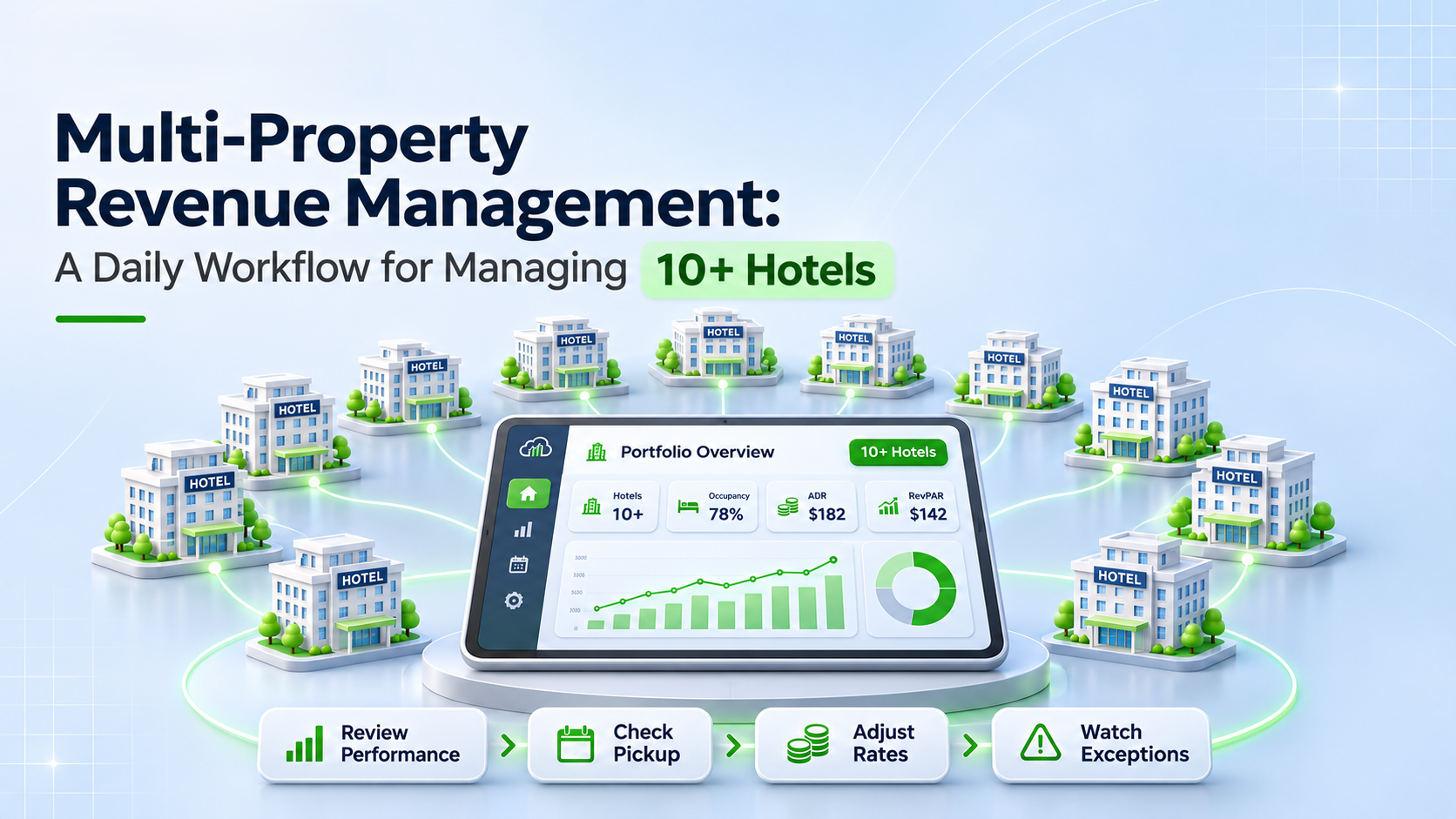
Running one hotel’s revenue is a craft. Running twelve is a queue problem. The cluster revenue manager who tries to give all twelve the attention they gave one property burns the morning rate-shopping the first six and never reaches the dates that actually move money.
Multi-property revenue management works when you stop treating it as many small jobs and start treating it as one prioritized queue. The portfolio tells you where to spend the next hour; you act on what changed, not on every date on every property. This guide lays out that daily workflow — exception-based, hour-by-hour — plus the scale math that lets one RM cover 10, 20, or more hotels without dropping the ones that are slipping.
I run 14 hotels. By the time I finish rate-shopping the first six, the day’s half gone and I’ve touched nothing strategic. Something is always slipping — I just don’t know which property until it’s too late.
Quick scope note: this is the daily workflow guide — the routine a cluster RM runs across a portfolio. For the software that consolidates the portfolio view, see the portfolio dashboard; for how RevEvolve is set up for multi-property hotel groups, see the solution page. Here, the focus is the routine itself — what you look at, in what order, every day.
Key takeaways
- Multi-property RM is a queue problem — prioritize, don’t replicate twelve single-hotel routines.
- Work exception-based: act on the dates that changed, not every date on every property.
- Start from one cross-portfolio view, then drill into the flagged properties.
- Exception-based workflow lifts coverage from 7–8 hotels per RM to 22+.
- A standard portfolio routine cuts RGI variance across properties.
What is multi-property revenue management?
Multi-property revenue management is the management of pricing, inventory, and demand across a group of hotels from a single above-property position, rather than one revenue manager per hotel. The person doing it — a cluster, regional, or above-property revenue manager — owns the revenue performance of the whole portfolio, not one building.
The shift from single-property to portfolio RM isn’t just ‘more of the same.’ The job changes shape. You trade depth on one hotel for triage across many, and the skill becomes knowing where to spend limited attention. That’s why the daily workflow — not the tooling alone — is what separates a cluster RM who scales from one who just spreads thin.
How many hotels can one revenue manager handle?
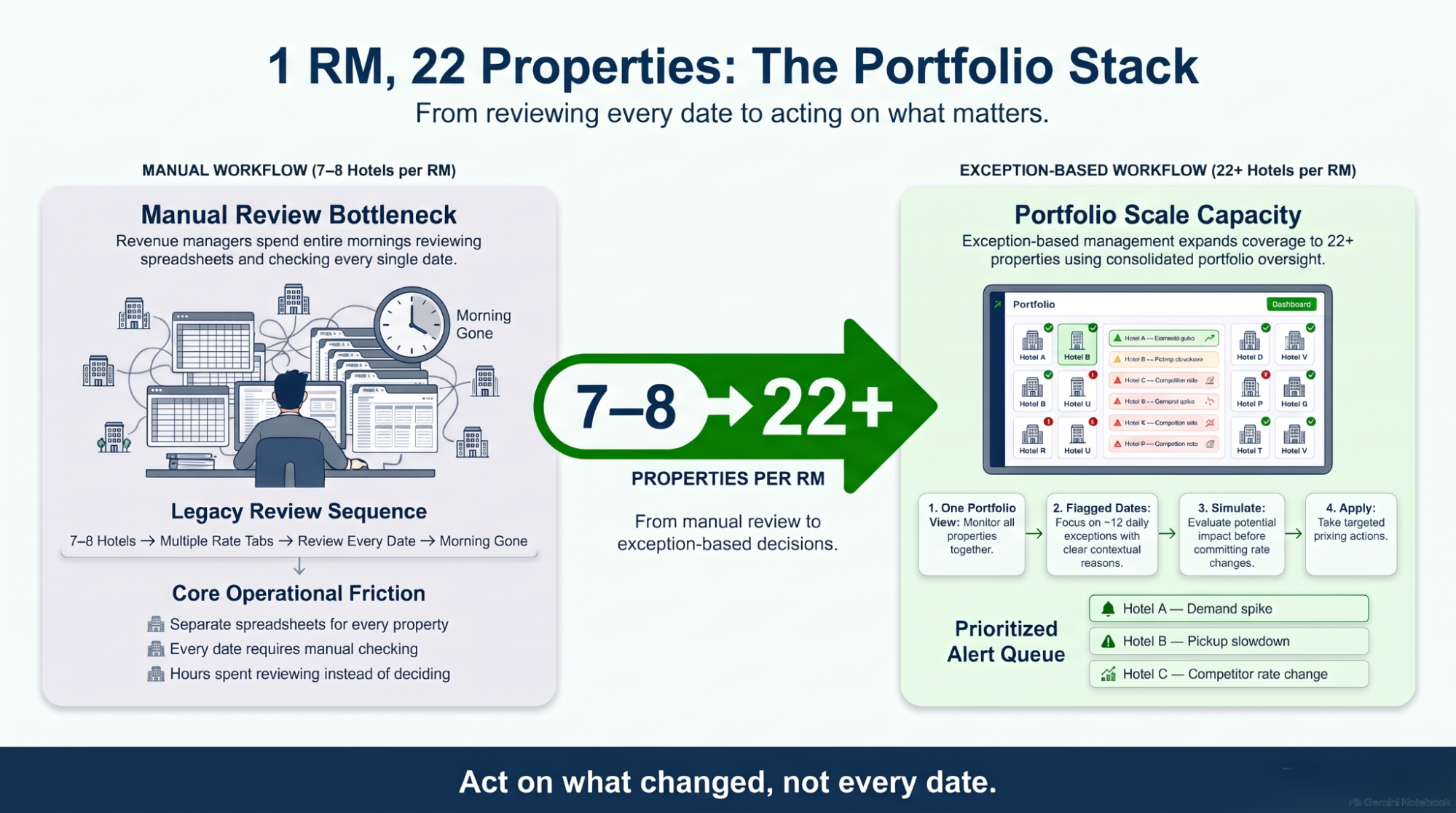
Manually — juggling a spreadsheet and a rate-shopping tab per property — a revenue manager realistically covers 7 to 8 hotels before quality drops. With an exception-based workflow that surfaces only the dates needing a decision, that climbs to 22 or more properties per RM seat. The limit isn’t the number of hotels; it’s how many you can meaningfully review by hand each day.
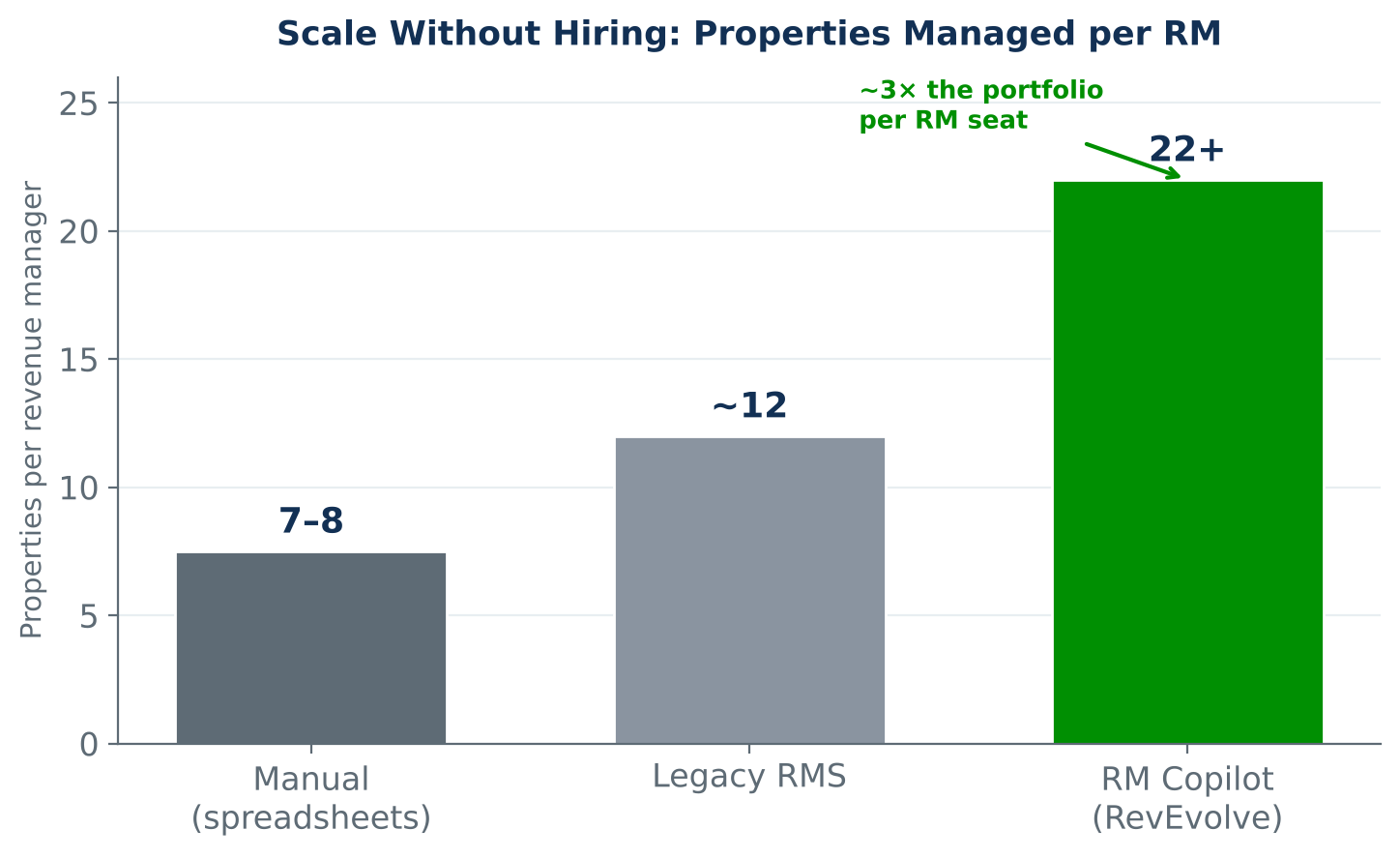
That jump is the whole business case for portfolio RM. When ownership adds four hotels and no headcount, the manual operator just gets thinner coverage. The exception-based operator absorbs them, because most of those new dates won’t need a decision on any given day — and the few that do get surfaced automatically.
The daily workflow: exception-based, not all-dates
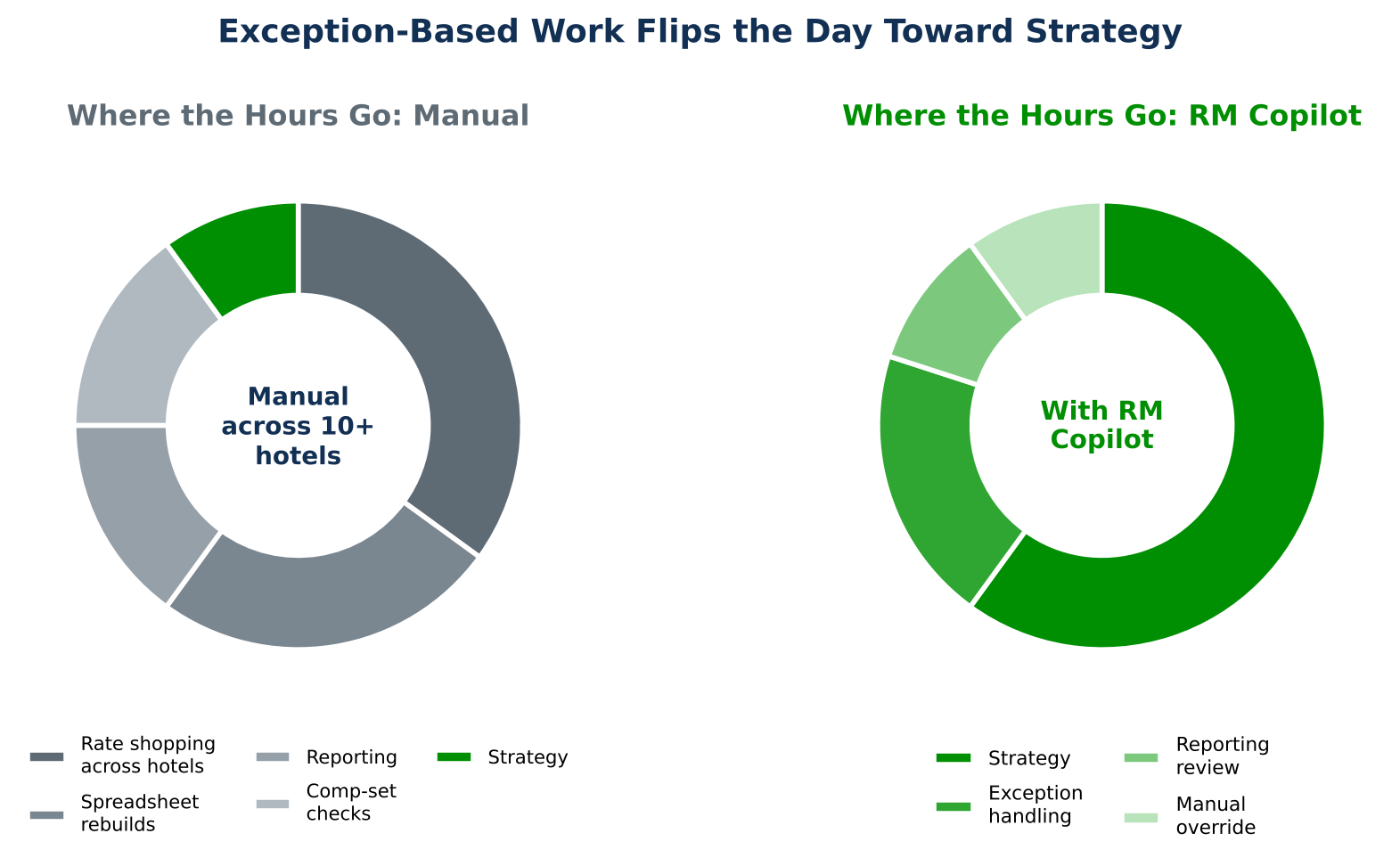
The core move in multi-property RM is exception-based review: you don’t look at every date on every hotel, you look at what changed. A portfolio of 10 hotels has thousands of open date-cells on the books. The vast majority are tracking fine and need nothing from you today. The job is to find the handful that moved — on pace, pickup, compset, or an event — and act on those.
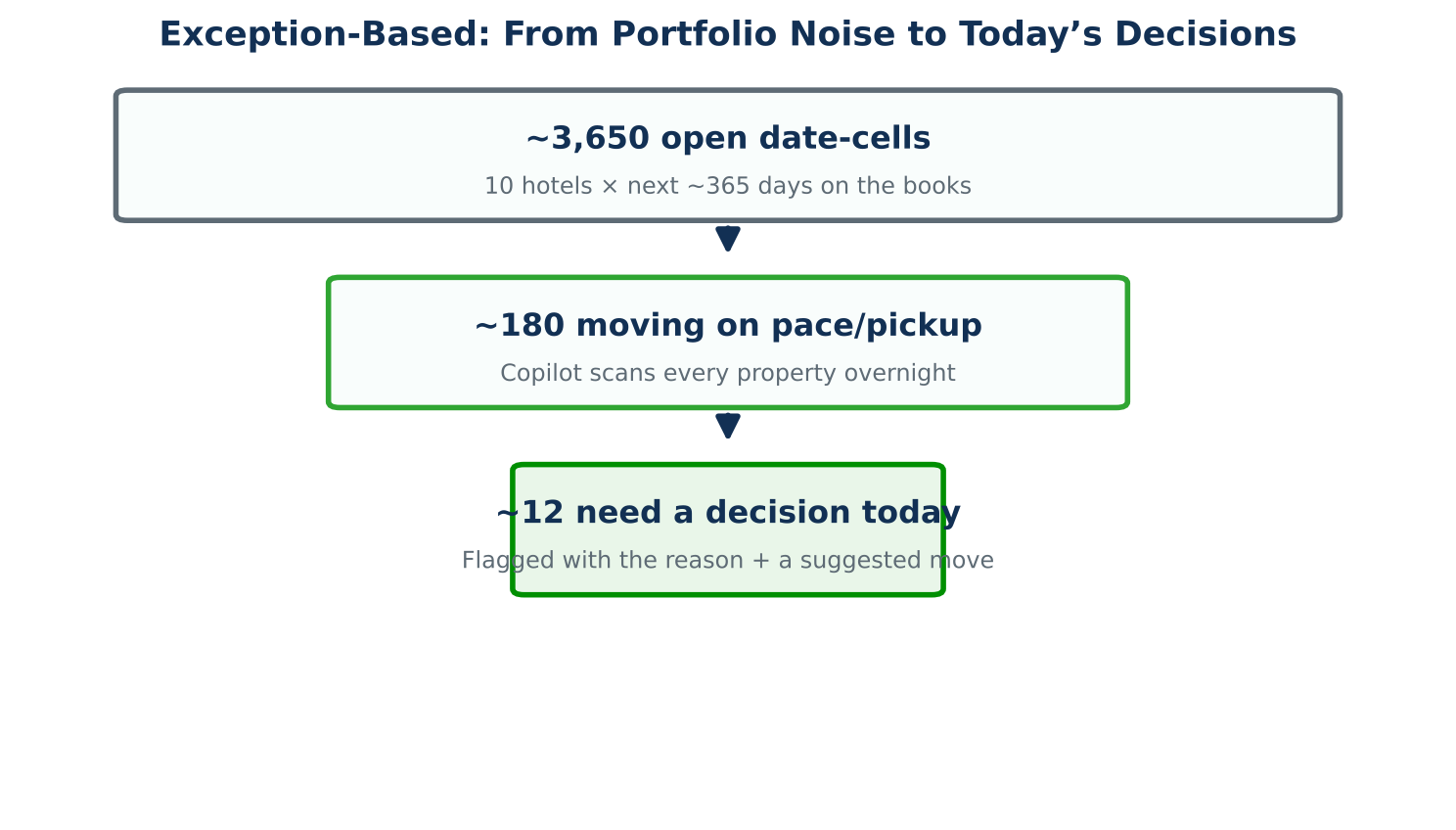
Here’s the routine that produces that focus, start to finish:
- Scan the cross-portfolio view — open one screen that ranks all properties by what needs attention (pace gaps, pickup swings, parity or compset moves), not a dashboard per hotel.
- Work the flagged exceptions — the system surfaces the specific dates and properties that moved, each with the reason it was flagged, so you’re reading decisions, not hunting for them.
- Review the context — for each flagged date, check pace vs last year, pickup trend, remaining compression, and any event or group block behind the move.
- Simulate the change — model the rate or restriction move and see the projected effect before you commit it.
- Apply and log — your team applies the decision, and it’s logged with the reason so next week’s review starts from a clean record.
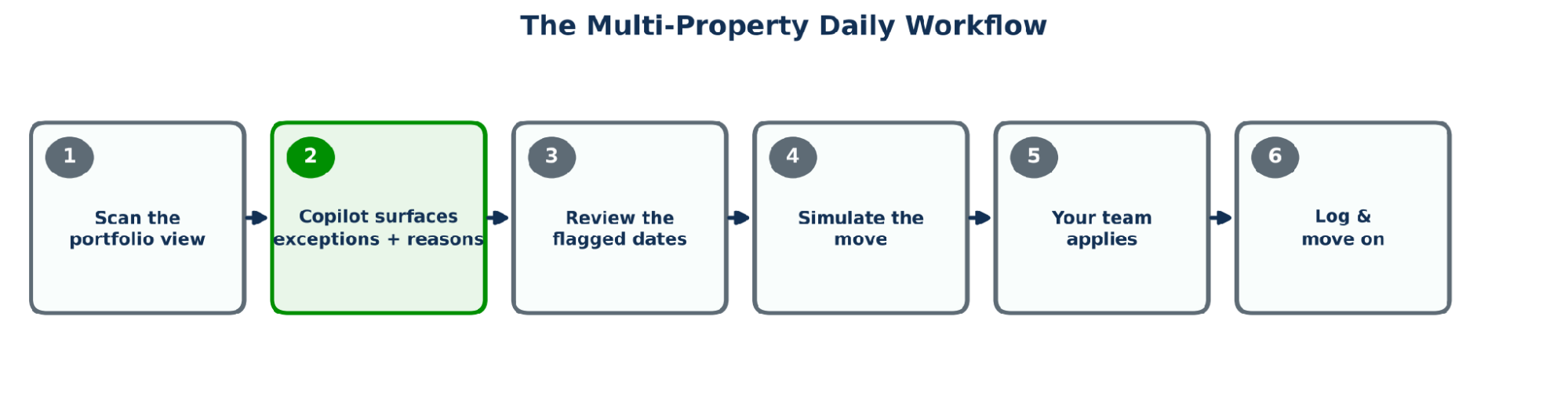
Run this way, a 10-hotel portfolio is a 60-to-90-minute morning, not an all-day grind — because you spend time only where the data says a decision is needed.
The cluster RM daily checklist
Print this, or rebuild it as a saved view. It’s the same routine, compressed to a run-list you can clear every morning across the portfolio.
- Open the cross-portfolio view; sort by what needs attention.
- Clear the flagged exceptions — decision by decision, reason by reason.
- Check the next 7–14 days of high-compression dates across all properties.
- Scan for parity or compset moves that crossed your thresholds.
- Review any properties with an event or group block in the window.
- Simulate and apply the day’s moves; log each with its reason.
- Note anything to revisit tomorrow; close the loop.
Where multi-property RM breaks down
The workflow is simple; the ways it fails are consistent. Three show up across almost every portfolio.
It becomes 15 single-hotel jobs
The most common failure: the cluster RM tries to give every property the full single-hotel treatment. There aren’t enough hours. Without a prioritized queue, ‘above-property’ just means doing the same job fifteen times, badly. Exception-based review is the fix — one queue, not fifteen routines.
No standard playbook, so every hotel drifts
When each property runs its own logic and its own spreadsheet, performance diverges — RGI variance widens across the portfolio, and ownership asks why two similar hotels perform differently. A standard workflow and shared thresholds pull the portfolio back together.
The portfolio view is just 15 dashboards
A ‘portfolio view’ that makes you click into each hotel to see what’s happening hasn’t saved you anything. The view has to rank and flag — tell you where to spend the next hour — or it’s just more screens. If it doesn’t surface exceptions, it isn’t doing the job.
Case study: 47 hotels on one workflow
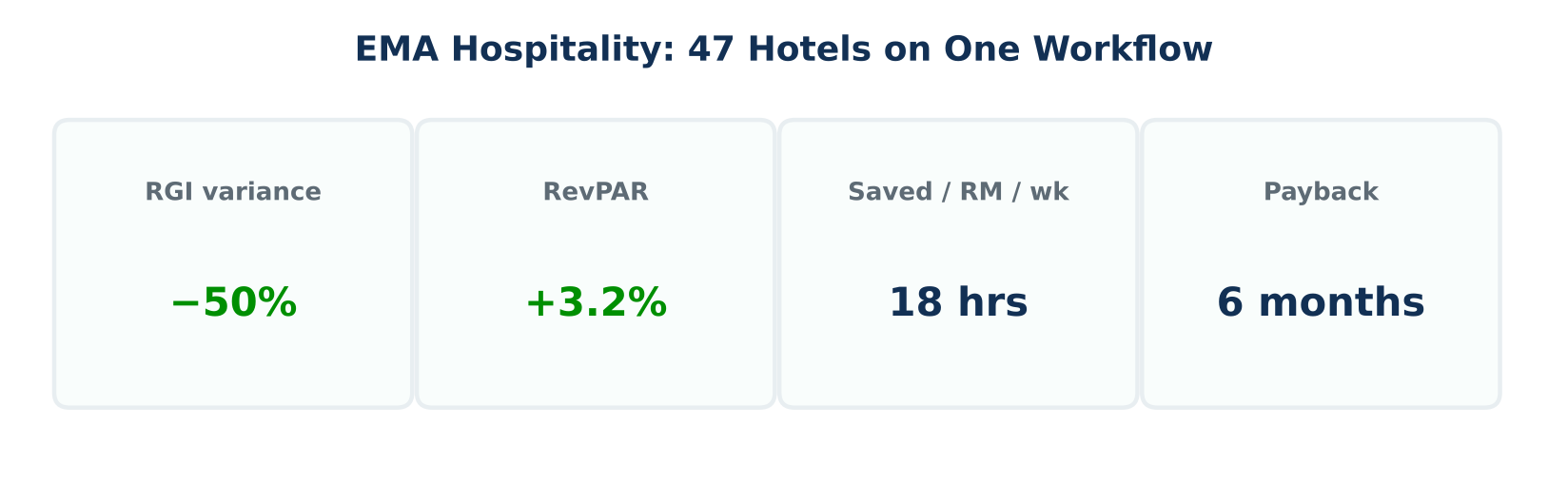
EMA Hospitality ran its portfolio on a single exception-based workflow across 47 hotels and cut RGI variance across those properties by 50%, lifted RevPAR 3.2%, and gave each revenue manager back 18 hours a week — with a six-month payback. The mechanism is exactly the routine above at portfolio scale: one cross-property view, exceptions surfaced with reasons, simulate, apply, log. The consistency is what drove the variance down; the time savings came from not reviewing dates that didn’t need it.
How RevEvolve runs the portfolio with you
RevEvolve’s RM Copilot is built for exactly this workflow. It works from your own portfolio data — every property’s pace, pickup, and on-the-books — and surfaces the dates that need a decision today, each with the reason it was flagged. The portfolio dashboard is the single cross-property view you start from; Copilot ranks it so the morning scan takes minutes, not hours.
What it doesn’t do matters as much as what it does. RM Copilot recommends and simulates; it does not auto-publish rates or push changes to your PMS, CRS, or OTAs, and there is no autonomous mode. It runs in Advisor or Co-Pilot mode — your team reviews each surfaced recommendation, simulates the move, and applies it. The decisions stay yours; what changes is that you only spend time on the ones that need you. Alerts are threshold-based — you set the triggers, and the portfolio tells you when something crosses them.
| Multi-property pain | RM Copilot capability | Outcome |
|---|---|---|
| All-dates review eats the day | Exception-based flags with reasons | A 60–90-min morning, not all day |
| Which property is slipping? | Ranked cross-portfolio view | You always know where to look first |
| Hotels drift apart on RGI | One standard workflow + thresholds | Portfolio consistency, less variance |
| Fear of a black box | Advisor / Co-Pilot modes — you apply | Human controls every decision |
Scaling the portfolio: three objections
Run the portfolio as one queue
A cluster RM who treats twelve hotels as twelve jobs will always be behind. The one who treats them as a single prioritized queue — scanning one view, acting on what changed, leaving stable dates alone — covers the whole portfolio in a morning and spends the rest of the day on strategy. That’s the difference between spreading thin and actually scaling.
Build the routine first: one portfolio view, exception-based review, simulate, apply, log. Then let the tooling do the scanning so you only touch the decisions that need you. For a portfolio that did exactly this across 47 hotels, read the EMA Hospitality case study — and see what one standard workflow did to their variance and their hours.