QUICK ANSWER — A hotel budget simulator is a planning tool that builds a full-year hotel budget on one screen. It combines monthly seasonality, segment-level room and revenue splits, rate strategy, and distribution costs into connected assumptions a revenue manager can adjust and instantly recalculate — replacing fragile, multi-tab spreadsheets with a single model the whole team can defend.
It’s August. A revenue manager has fourteen browser tabs open. One holds last year’s occupancy by month. Another has segment mix. A third has an OTA-commission formula that broke back in July. The GM wants a first-draft budget by Friday. It’s Tuesday.
This is budget season, and for most hotels it still runs on a fragile spreadsheet held together by memory and manual math. A budget simulator fixes the part that hurts most: rebuilding the model every time an assumption changes.
This guide covers building the annual budget — not day-to-day forecasting. For that, see our forecasting foundations guide. By 2026, with U.S. RevPAR forecast to grow just 0.6% (CoStar / Tourism Economics, February 2026), a sloppy budget isn’t a rounding error — it’s the whole margin.
…if you have to pull a million reports or feel that you and your team are living and dying in Excel.
Key takeaways
- A budget simulator replaces 14 spreadsheet tabs with one recalculating screen.
- Seasonality dials (OCC × ADR multipliers) turn last year’s shape into next year’s plan.
- Segment-level splits — Group, Corporate, Government, OTA — budget each channel on its own terms.
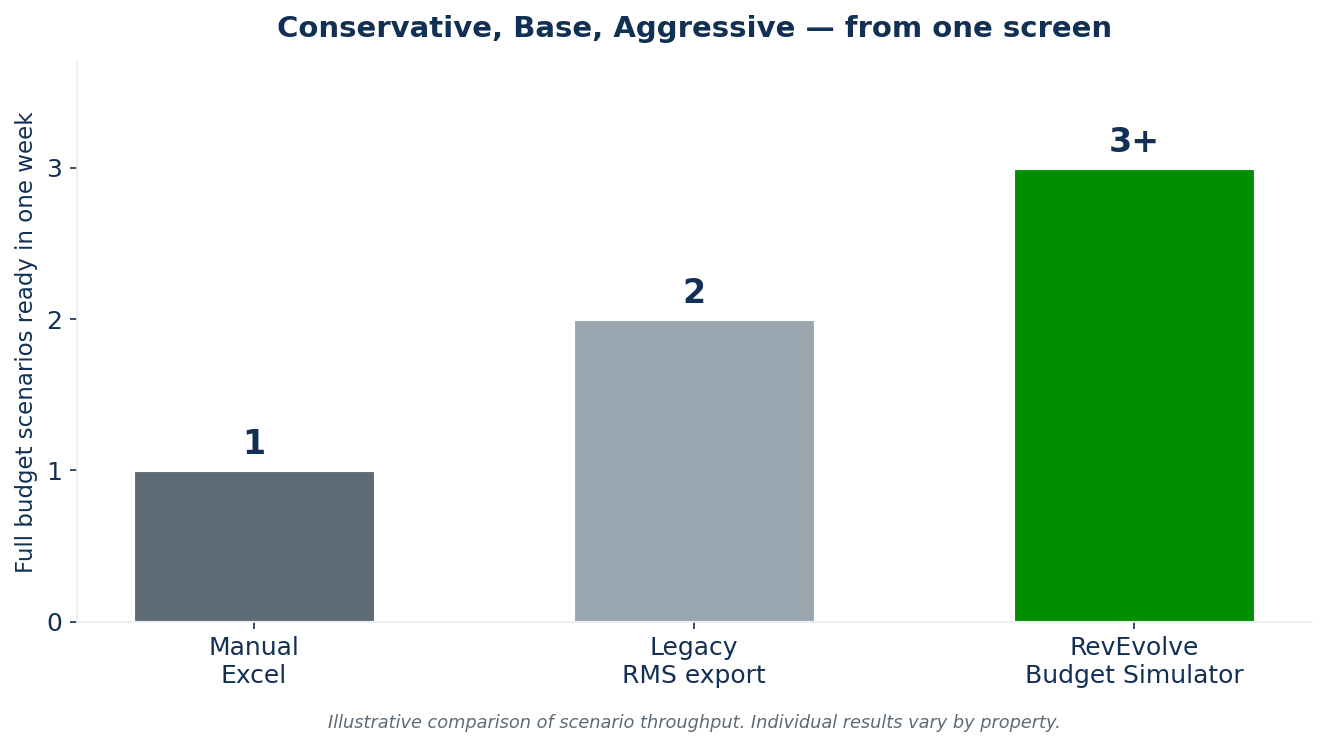
- Scenario toggles produce Conservative, Base, and Aggressive versions in minutes, not days.
- EMA Hospitality cut RGI variance 50% across 47 hotels with model-driven planning.
What Is a Hotel Budget Simulator?
Think of the difference this way. A spreadsheet stores numbers. A simulator understands relationships — that bumping August occupancy 10% changes room nights, gross revenue, RevPAR, and your distribution cost all at once. The revenue manager stops re-deriving math and starts making decisions.
Why Hotel Budgeting Breaks Down in Excel
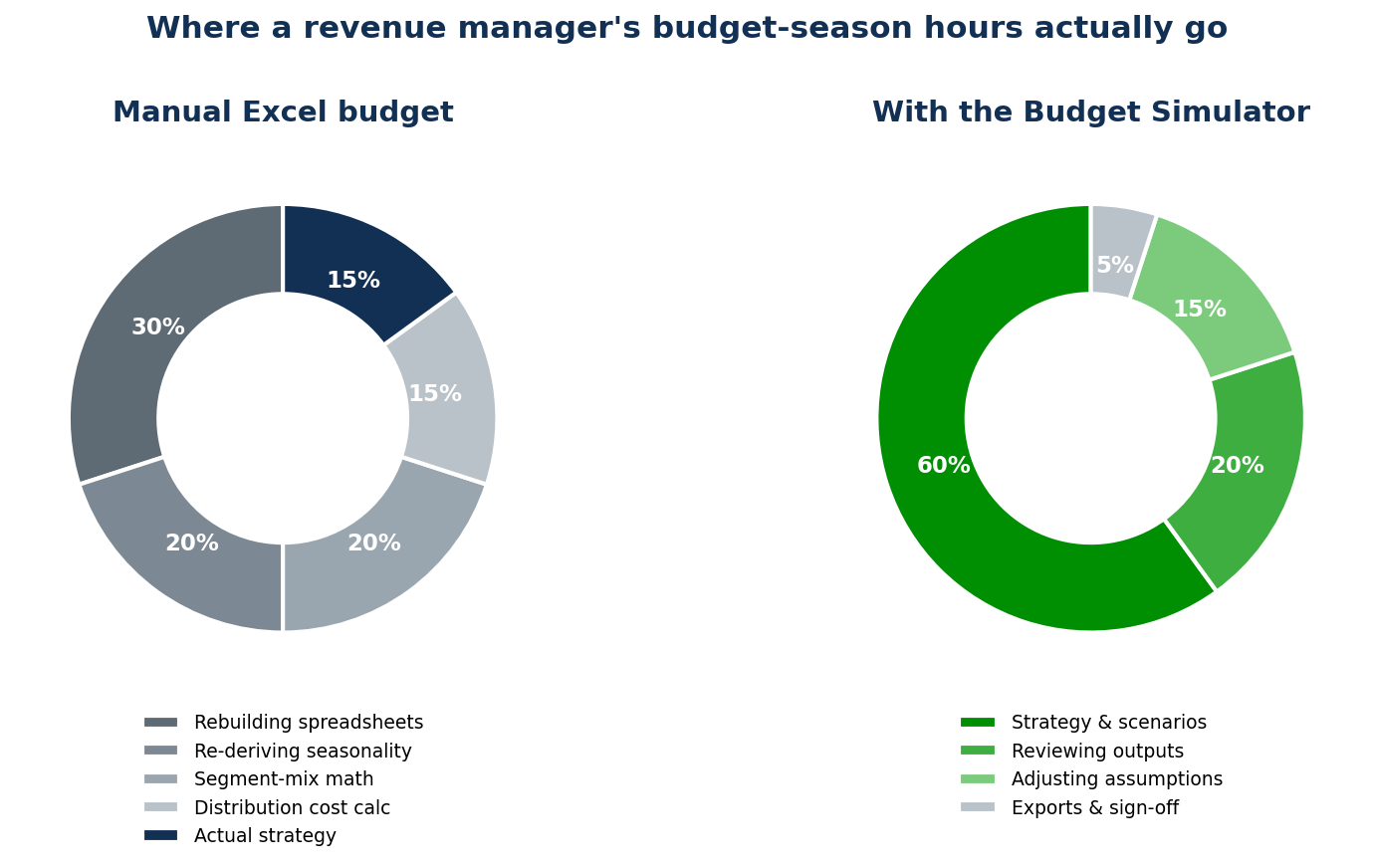
Excel is where most hotel budgets are born and where most of them break. The problem isn’t the tool — it’s what the tool forces you to do by hand. Three failure modes show up every budget season.
1. The model breaks when someone inserts a row
One inserted row shifts a reference, a formula silently points at the wrong cell, and a $4M revenue line is off by a floor. Nobody notices until ownership does.
2. Seasonality gets re-typed from scratch
Every year the same ritual: pull last year’s monthly occupancy and ADR, eyeball the shape, and type static numbers into a grid. It eats a week and encodes last year’s guesswork into next year’s plan.
3. Segment mix and distribution costs live in different tabs
Group is on tab 3, OTA commissions on tab 9, and reconciling them is manual. Change one segment’s rate and nothing downstream updates. That’s where the guesswork — and the arguments with the GM — begin.
How to Build a Hotel Budget With a Budget Simulator (5 Steps)
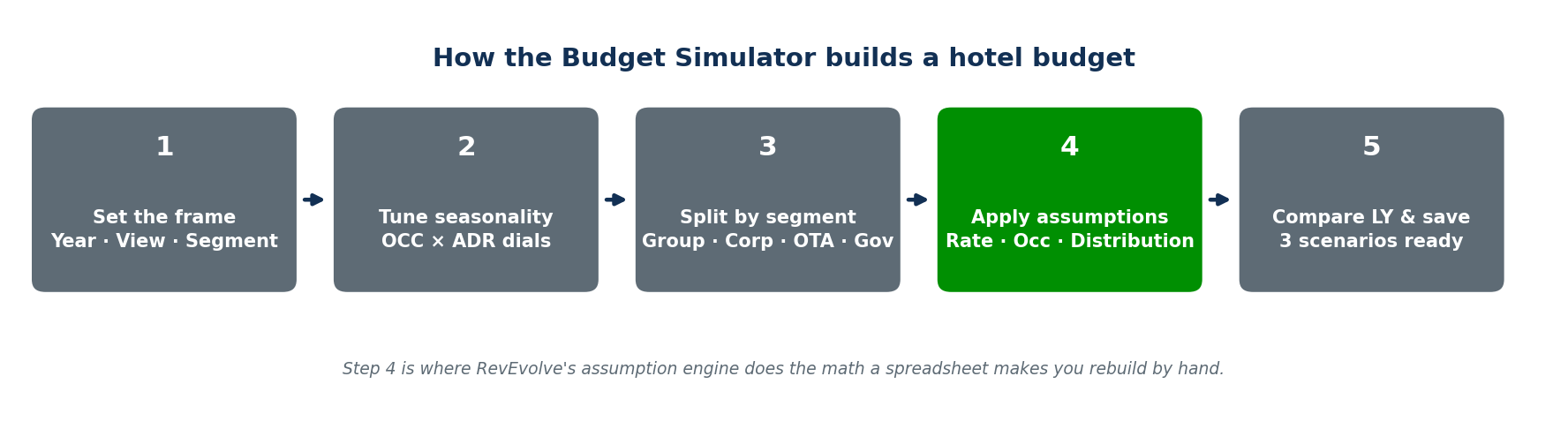
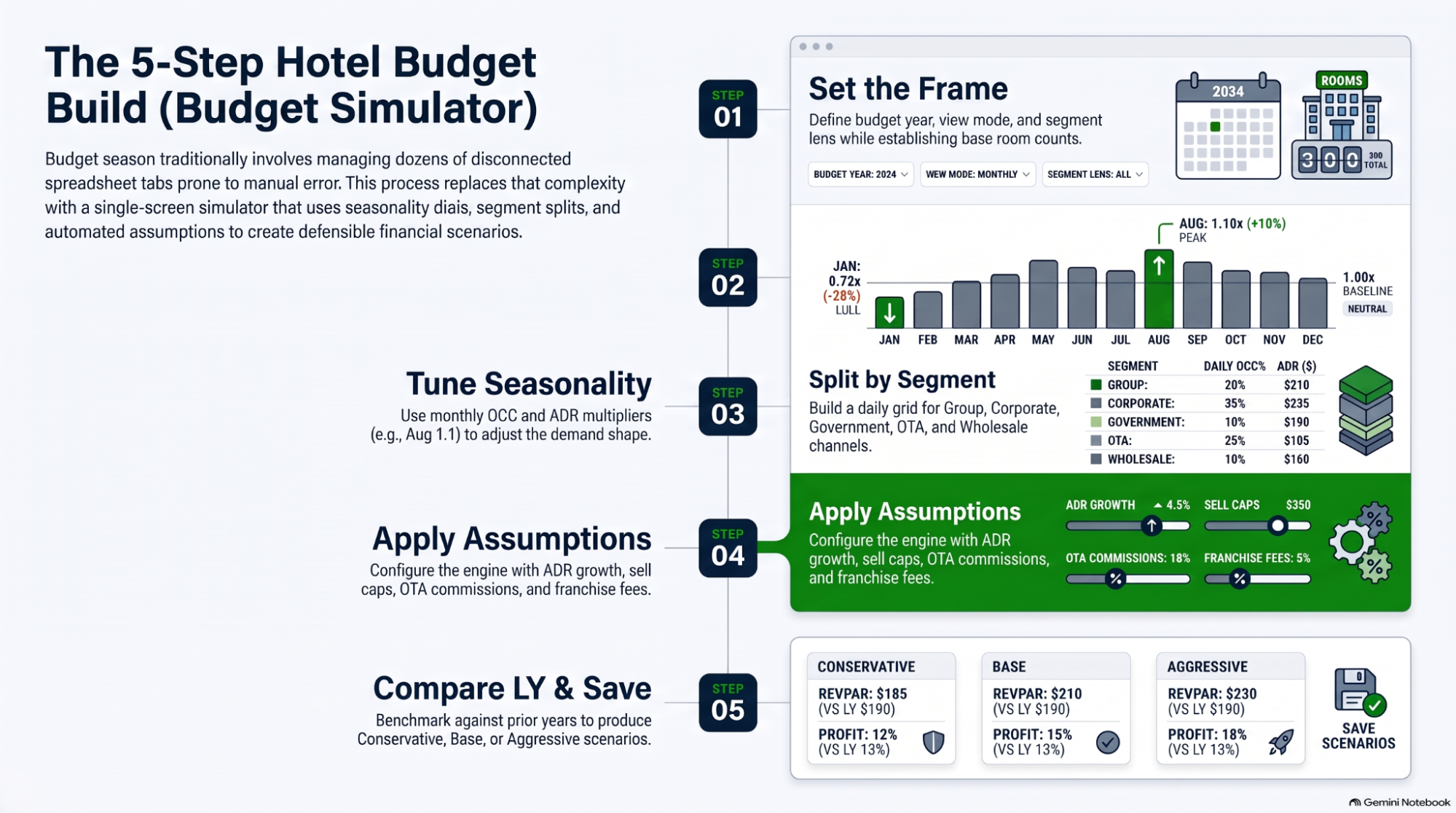
Here’s the workflow the RevEvolve Budget Simulator turns into a single screen. Each step maps to a control you can see and edit.
Step 1 — Set the frame
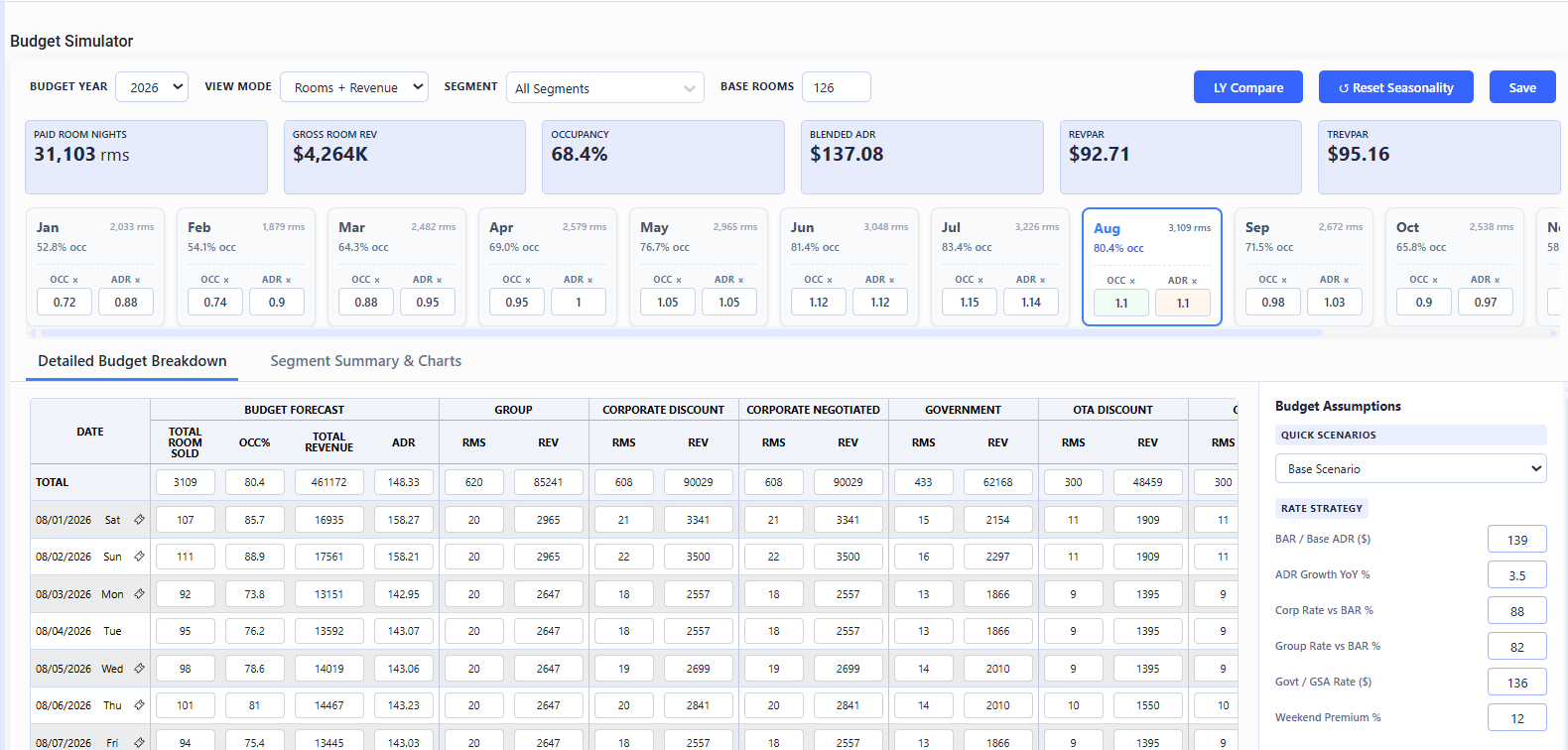
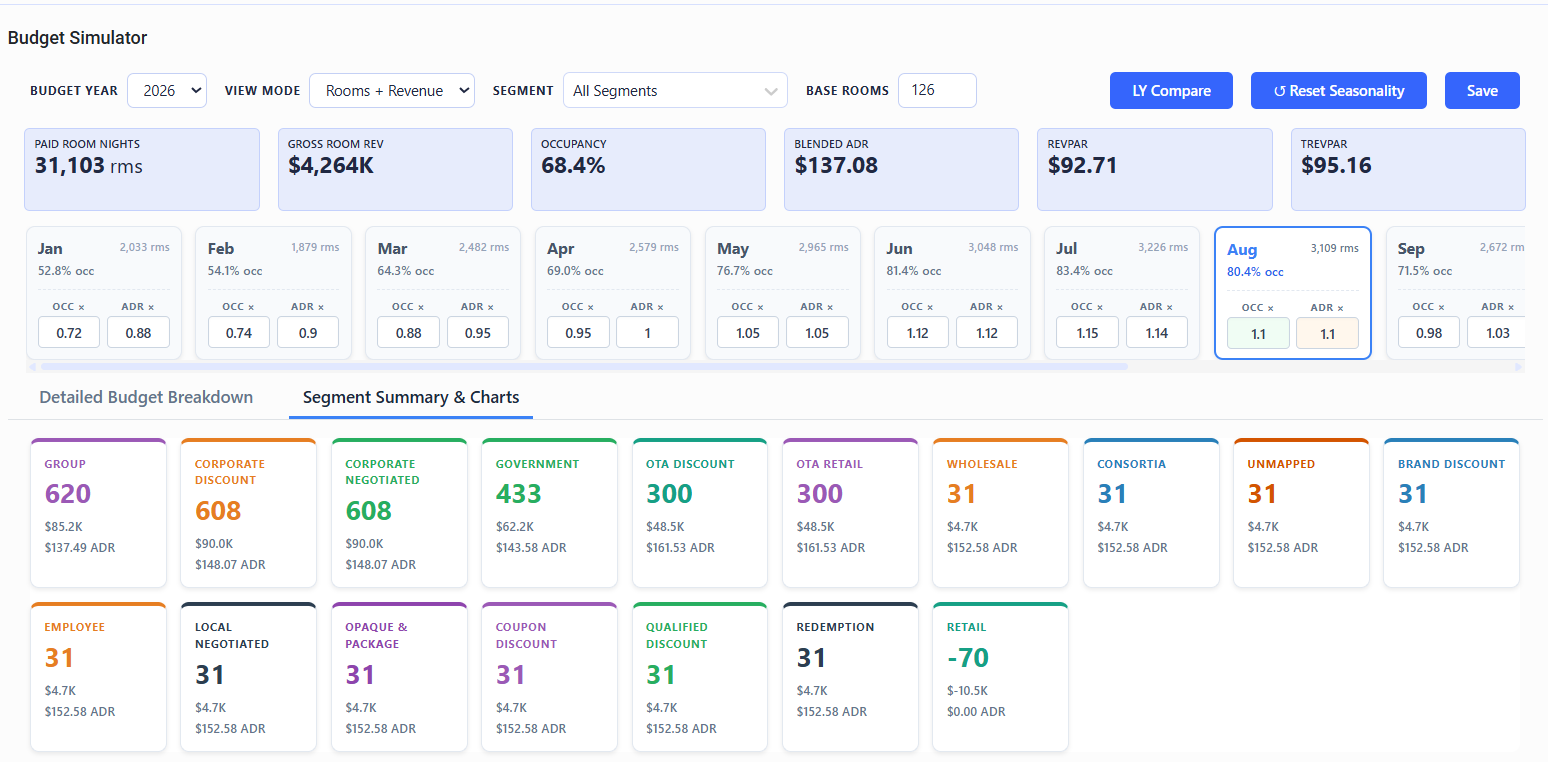
Choose the budget year, a view mode (Rooms + Revenue, Rooms Only, Revenue Only, or ADR Focus), and a segment lens. Set your base rooms. This is the context every downstream number inherits.
Step 2 — Tune seasonality, don’t retype it
Every month gets a card with two dials: an OCC multiplier and an ADR multiplier. Want a stronger August? Set both to 1.1 for a 10% lift over baseline; drop January to 0.72 for the winter lull. You’re tuning a model that already knows the shape of your year, pulled from historical seasonality — not typing static cells.
Step 3 — Split by market segment
Budget each channel on its own terms — Group, Corporate Negotiated, Corporate Discount, Government, OTA, Wholesale, Consortia. A daily grid shows exactly what each market segment contributes per day, so the mix is a decision, not an afterthought.
Step 4 — Apply your assumptions
The assumptions panel is the engine. Set rate strategy (BAR / base ADR, ADR growth %, corporate and group rate positioning, GSA rate, weekend premium), occupancy and inventory limits (target, demand growth, sell caps, comp and out-of-order rooms, group block and wash), ancillary revenue (F&B, meetings), and cost of distribution (OTA commission, GDS/CRS fees, franchise fee, loyalty cost, occupancy tax). Toggle a Quick Scenario — Conservative, Base, or Aggressive — to reset your whole risk posture in one click.
Step 5 — Compare against last year, then save
Run LY Compare to benchmark every assumption against 2025, 2024, or further back. Confirm occupancy targets are realistic against what the hotel actually delivered, then save. You now have a defensible budget — with a segment-level story behind every number.
Where Hotel Budgets Go Wrong (and How a Simulator Prevents It)
Even sophisticated hotels lose the budget in the same four places. A simulator closes each gap by keeping the model connected.
- Copy-paste seasonality. Static numbers hide the real demand shape. Dials keep it live.
- Blended-average budgeting. One ADR across all segments buries a weak OTA mix. Segment splits expose it.
- Forgotten distribution cost. A budget that ignores OTA commission and franchise fees overstates net revenue. Cost inputs bake it in.
- One-scenario budgets. Ownership always asks for a second version. Scenario toggles have it ready.
Where a Budget Simulator Actually Pays Off
For the revenue manager
Budget season stops being a spreadsheet rebuild. You spend the week on pace, displacement, and segment strategy — the judgment calls — while the model handles the math and the recalculation.
For the general manager
You get the 60-second read: three scenarios, a clear RevPAR line, and a segment story you can take to ownership without re-checking a formula.
For the asset manager
Across a portfolio, a shared model means every property budgets the same way. That consistency is what turns variance from a surprise into a number you can manage — which is exactly what EMA Hospitality saw below.
Excel vs Legacy RMS vs a Budget Simulator
| Capability | Manual Excel | Legacy RMS export | RevEvolve Budget Simulator |
|---|---|---|---|
| Single recalculating screen | No | Partial | Yes |
| Seasonality dials (OCC × ADR) | Manual retype | Limited | Yes |
| Segment-level daily budgeting | Separate tabs | Some segments | Group, Corp, Gov, OTA, Wholesale + |
| Distribution cost built in | Manual | Partial | Yes (commission, GDS, franchise, tax) |
| Conservative / Base / Aggressive | Rebuild each | Rare | One-click toggle |
| LY compare (multi-year) | VLOOKUP | Export only | Built in (2018→2025) |
Where the AI Fits — and Where It Doesn’t
A budget is a plan; pricing is the daily execution against it. That’s where RevEvolve’s RM Copilot comes in — and it’s worth being precise about category. RM Copilot is operator-facing: it recommends pricing actions with scenario analysis, and your team reviews and applies every decision. The Copilot doesn’t publish rates on its own — it hands the revenue manager a reasoned recommendation, and the human stays in control.
For the daily demand view that sits between the annual budget and the rate decision, see the Demand Calendar.
Case Study: EMA Hospitality Standardizes Budgeting Across 47 Hotels
EMA Hospitality ran budgets and forecasts the way most portfolios do — every property a little different, every operator’s spreadsheet its own dialect. Reconciling them for ownership was slow, and variance was a recurring surprise. Moving to a shared, model-driven approach changed the math.
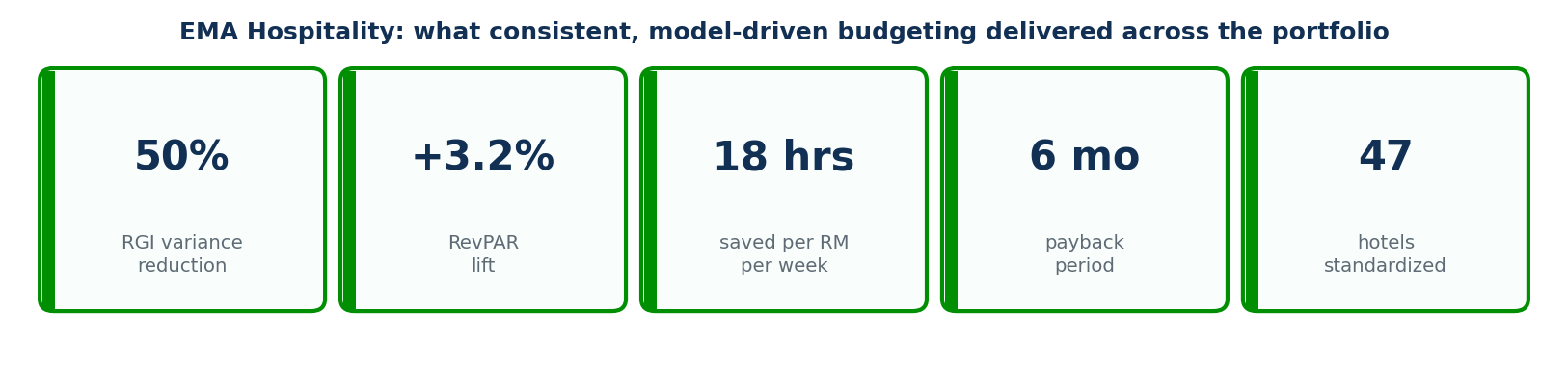
The headline for a budgeting story isn’t just the RevPAR lift — it’s the 50% cut in RGI variance across 47 hotels. Consistent budgeting made portfolio performance predictable, and the payback landed inside six months.
How RevEvolve Solves Budget Season
| The pain | The capability | The outcome |
|---|---|---|
| Rebuilding the model every change | One recalculating screen | Hours back per RM per week |
| Re-typing seasonality | OCC × ADR dials on historical data | Next year’s plan, not last year’s guess |
| Blended-average budgets | Segment-level daily splits | A defensible mix by channel |
| One-scenario pressure | Conservative / Base / Aggressive toggle | Three versions before Friday |
Three Objections Revenue Managers Raise
“A tool can’t know my market or my events.”
It doesn’t have to. You set the seasonality dials, the event-day overrides, and the segment targets. The simulator does the recalculation; you keep the market knowledge.
“Switching from Excel is a hassle.”
The switch is one-time; the spreadsheet rebuild is every year. Most teams recover the setup time in their first budget season.
“Will ownership trust a model number?”
Ownership trusts numbers they can trace. A simulator shows the assumptions behind every line and benchmarks them against last year — which is more auditable than a spreadsheet only one person understands.
Budget Season Doesn’t Have to Mean Fourteen Tabs
Back to that revenue manager with the Tuesday deadline. With a budget simulator, Wednesday looks different: seasonality tuned, segments split, distribution costs baked in, and three scenarios — Conservative, Base, Aggressive — ready for the GM.
Not a rough first draft. A finished, defensible budget with a segment-level story behind every number. In a year where U.S. RevPAR is forecast to move less than a point, that difference is the margin. One screen, a few clicks, and a number you can actually stand behind.